

Table of Contents
E-commerce runs on a cycle that never really pauses — visitors land, some abandon a cart, a few checkout, and every one of them either becomes a repeat customer or disappears. The difference between a store that grows and one that plateaus often comes down to what happens in the inbox after someone visits.
Miss that window and the cost is real:
- An abandoned cart that never gets recovered
- A first-time buyer who never returns
- A warehouse full of inventory nobody hears about
Most stores run on a default welcome email, an occasional sale blast, and whatever transactional emails the checkout platform sends. A dedicated email marketing platform pulls the whole customer journey into one event-driven system, so every visitor, purchase, and follow-up triggers automatically.
What Is Email Marketing for E-Commerce?
Email marketing software sends and tracks every message a store sends to a shopper — welcome notes, shipping confirmations, win-back offers.
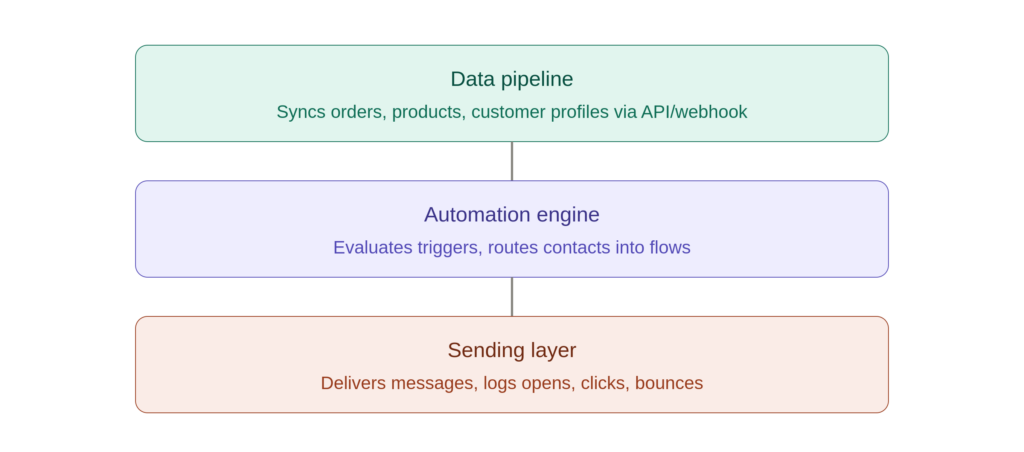
A good platform is really three layers stacked together:
- Data pipeline — syncs orders, products, and customer profiles in near real time (via API/webhook)
- Automation engine — evaluates trigger conditions (event type, delay, segment) and routes contacts into flows
- Sending layer — delivers the message and logs opens, clicks, bounces, unsubscribes
The key difference:
| Newsletter tool | E-commerce email platform |
| Sends a list a message | Reacts to shopper behavior |
| Manual, scheduled sends | Automated, event-triggered sends |
| One-size-fits-all | Segmented and personalized |
Why it matters: Baymard Institute’s research puts average cart abandonment near 70% — meaning most potential revenue never reaches checkout on the first visit.
Why Online Stores Need Dedicated Email Marketing
1. Behavior-driven, always-on messaging
Automated flows react the moment a trigger fires:
- Cart created, no checkout → abandoned cart series (T+1hr, T+24hr, T+72hr)
- Product viewed, no cart → browse abandonment (T+2–4hr)
- Order confirmed → post-purchase follow-up (immediate)
- Replenishment cycle due → reorder reminder (rules-based)
- No opens/clicks in 90–180 days → win-back series
2. Customer retention and repeat revenue
- Bain & Company: a 5% increase in retention can lift profits 25–95%
- RFM segmentation (recency, frequency, monetary value) separates loyal customers from at-risk ones
- Klaviyo and industry benchmarks put email ROI north of $30 for every $1 spent
3. Consistent brand experience at scale
As a list grows into the tens of thousands, manual sends stop working. A platform keeps:
- The same triggers
- The same segmentation logic
- The same authenticated sending domain
- The same brand voice across every touchpoint
Core Email Marketing Use Cases for E-Commerce
Abandoned cart & browse abandonment recovery
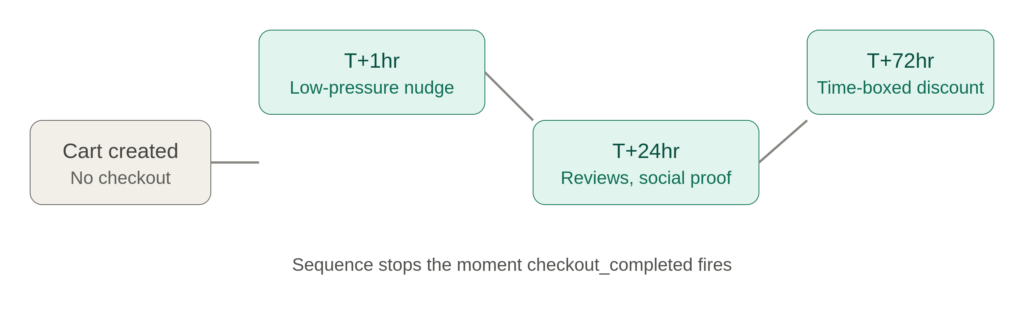
The platform watches for cart_updated, waits a dwell period, then checks for checkout_completed before firing:
- First nudge, within the hour — a quick, low-pressure note showing what’s still sitting in the cart, with a one-click way back to checkout
- Follow-up the next day — a slightly firmer tone, maybe a customer photo or star rating to build confidence in the purchase
- Final touch, two to three days out — a last check-in, sometimes sweetened with a small, time-boxed discount to push the decision
Browse abandonment works the same way for a product_viewed event with no cart activity.
Welcome series & new-subscriber onboarding
A typical 3–5 email sequence, triggered off double opt-in:
- Confirmation + brand intro
- Best-sellers / category highlights
- First-purchase incentive
- Social proof (reviews, UGC)
- Soft CTA back to store
Post-purchase & reorder follow-ups
- Review request (timed to delivery date)
- Cross-sell/upsell based on order contents
- Replenishment reminder for consumables
Customer segmentation by purchase behavior
Segment by:
- Purchase count & average order value (AOV)
- Product/category affinity
- Engagement score
- Lifecycle stage: new → active → at-risk → lapsed → VIP
List growth & lead capture
- Pop-ups, checkout opt-ins, referral incentives, social sign-up forms
- All feeding one contact database via API or native integration
- Double opt-in keeps deliverability clean from day one
Campaign & promotional sends
Track these metrics per send:
- Open rate (less reliable post–Apple Mail Privacy Protection)
- CTR (click-through rate) / CTOR (click-to-open rate)
- Bounce rate (hard vs. soft)
- RPE (revenue per email) / RPR (revenue per recipient)
Key Features to Look For
✅ Behavior-triggered automation for cart/browse abandonment
✅ Visual flow builder for welcome, post-purchase, win-back
✅ Deep storefront integration (native app or API/webhook)
✅ Segmentation by RFM and behavioral data
✅ Built-in sign-up forms and pop-ups
✅ Deliverability tooling: SPF/DKIM/DMARC, IP warming, bounce handling
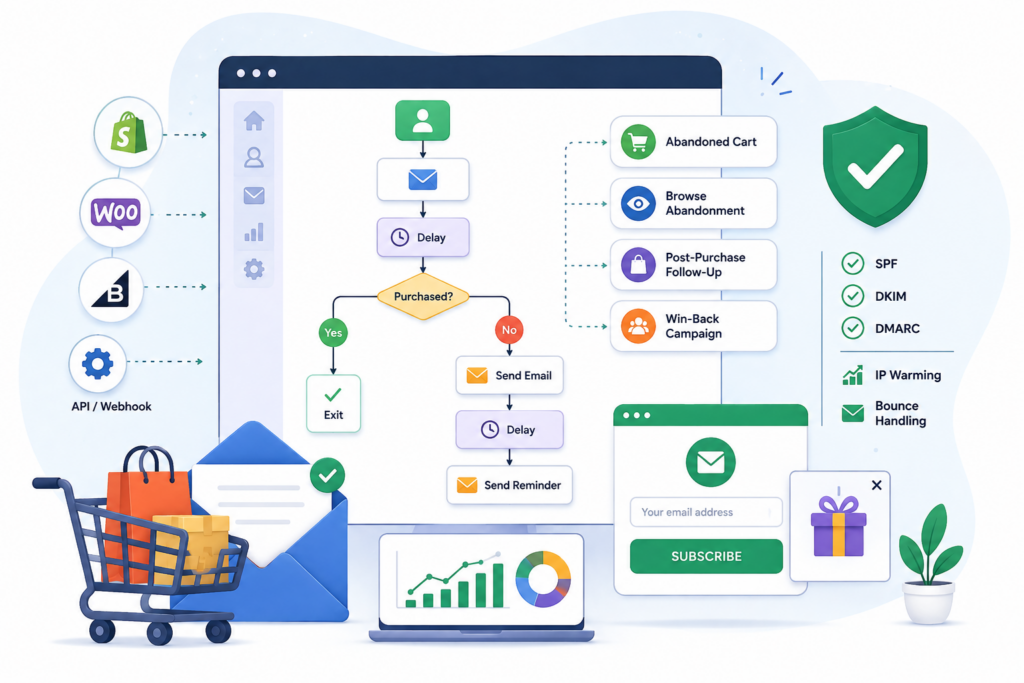
A closer look:
- Automation — look for webhook support on events like order_created, cart_abandoned, customer_created
- Flow builder — drag-and-drop, with triggers, delays, conditional (if/else) logic
- Integrations — native apps for Shopify/WooCommerce/BigCommerce beat manual CSV imports
- Personalization — merge tags + dynamic content blocks (product recommendations)
- Deliverability — SPF, DKIM, DMARC authentication; dedicated IP + warming schedule for high-volume senders
How Mailmarketer Works for Online Stores
Mailmarketer brings behavior-triggered automation, campaign sending, segmentation, and list growth into one platform, connected natively to your storefront.
What’s included on the starter plan:
- Core automation flows (welcome, abandoned cart, post-purchase)
- Unlimited campaign sends up to your list size
- Drag-and-drop sign-up forms
- RFM segmentation
- A/B testing against revenue (RPE), not just open rate
- Analytics dashboards with flow-level revenue attribution
- SPF/DKIM/DMARC support + IP-warming guidance
The Growth plan adds advanced segmentation, unlimited flows, and priority/dedicated-IP sending.
How to Choose the Best Email Marketing Tool
| Store type | Priority features |
| Small/boutique | Cart recovery, simple flows, low cost |
| High-SKU / consumables | Replenishment triggers, product-feed personalization |
| Multi-category retailer | Deep RFM segmentation, A/B testing |
| High-volume sender | Dedicated IP, advanced deliverability |
Watch the pricing model:
- Per-contact pricing → penalizes list growth
- Per-send pricing → scales with usage, can spike on sale days
- Automation as a paid add-on → punishes exactly the stores trying to save time
💡 Tip: Model your cost at 2x your current list size and 2x send volume before committing.
Getting Started
- Connect your storefront platform (native app or API)
- Authenticate your sending domain (SPF, DKIM, DMARC)
- Turn on a welcome series + abandoned-cart flow
- Segment your list by purchase behavior (RFM)
- Layer in campaigns once automation is running
No need to commit before finding out if it fits — set up the core flows, connect a few live products, and watch open rate, CTR, and revenue per email move against a real sales week before scaling up.