

Table of Contents
Executive Summary
The email landscape of 2026 has fundamentally shifted. Following the strict enforcement of bulk sender guidelines established by major mailbox providers like Google and Yahoo, the tolerance for poor list hygiene has effectively vanished. Bounce rates are no longer merely a campaign metric; they are a primary input for IP reputation scoring and domain authority.
For enterprise senders, maintaining a low bounce rate is a critical infrastructure requirement. A hard bounce rate exceeding 0.5% is now a statistically significant indicator of poor data governance, capable of triggering immediate throttling or placement in the spam folder.
This technical guide outlines the architecture of bounce handling within enterprise-grade email platforms, defines the 2026 benchmarks for hard vs. soft bounces, and provides the protocols necessary to secure your sender reputation.
1. The Physics of Bounces: SMTP Classification (4xx vs 5xx)
To manage bounces effectively, one must understand the SMTP (Simple Mail Transfer Protocol) conversation defined in RFC 5321. When your sending platform (MTA) attempts a handoff to a receiving server, that server responds with a status code. These codes dictate the immediate logic of the delivery engine.
The 4xx Series: Transient Failures (Soft Bounces)
- Definition: The receiving server cannot accept the message currently, but the failure is temporary.
- Common Codes: 421 Service not available, 451 Local error, 452 Too many recipients.
- Standard Protocol: Modern MTAs do not classify these as failures immediately. They place these messages into a retry queue with a geometric back-off schedule (e.g., retry at 1m, 10m, 1h, 4h) to avoid overwhelming the destination server.
- Risk: If a 4xx error persists beyond 72 hours, the system should convert it to a hard bounce to prevent queue clogging.
The 5xx Series: Permanent Failures (Hard Bounces)
- Definition: The message failed and will never be delivered.
- Common Codes: 550 5.1.1 User Unknown, 554 Transaction failed.
- Standard Protocol: These trigger an immediate “Hard Stop.” The recipient is automatically added to a Global Suppression List.
- Criticality: Repeatedly hitting 550 5.1.1 suggests a “directory harvest” attack. This is the fastest way to burn an IP address.
2. 2026 Bounce Rate Benchmarks (US & UK Markets)
The legacy “industry standard” of 2% is obsolete. In the current landscape of AI-driven filtering, acceptable thresholds have tightened.
Below are the Acceptable Email Bounce Rate 2026 benchmarks based on aggregate industry telemetry data across enterprise sectors:
| Metric | Exceptional | Acceptable | At Risk | Critical Failure |
| Hard Bounce Rate | < 0.1% | 0.1% – 0.3% | 0.5% – 1.0% | > 1.0% |
| Soft Bounce Rate | < 0.3% | 0.3% – 0.6% | 0.8% – 1.5% | > 2.0% |
| Block Rate | 0% | < 0.1% | > 0.1% | > 0.5% |
Regional Compliance Nuances:
- US Market: ISPs (Comcast, AT&T) and MBPs (Gmail, Outlook) prioritize volume consistency. Spikes in bounces during high-volume campaigns lead to immediate IP graylisting.
- UK Market: Under stringent GDPR enforcement, a hard bounce implies inaccurate data. Continuing to process or store invalid email addresses violates GDPR Article 5(1)(d) (Accuracy), creating legal liability beyond delivery issues.
3. Authentication Alignment and “Technical” Bounces
Not all bounces are caused by invalid email addresses. A significant portion of delivery failures in 2026 stems from Authentication Misalignment.
If your technical infrastructure does not align with your From address, receivers enforcing strict DMARC policies (p=reject) will bounce legitimate mail (550 5.7.1 Unauthenticated email).
The Triangle of Trust:
- SPF (Sender Policy Framework): Must authorize your ESP’s IPs to send on your behalf.
- DKIM (DomainKeys Identified Mail): The cryptographic signature must match the From domain.
- DMARC: The Return-Path (envelope sender) must align with the From header.
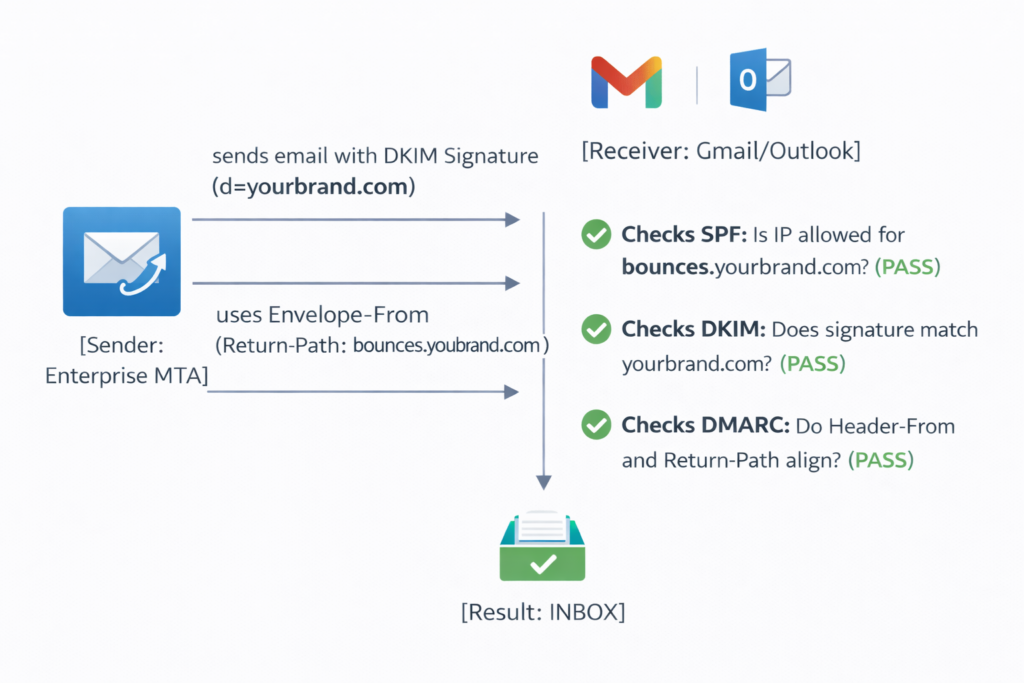
Implementation Strategy: Ensure you have configured a Custom Return-Path Domain (CNAME) in your platform settings. Relying on default generic return paths (e.g., sendgrid.net or mailgun.org) often breaks DMARC alignment for enterprise domains.
4. Infrastructure-Level Optimization Strategies
To maintain a sub-0.3% bounce rate, marketers must move from reactive cleanup to proactive filtering using native platform tools.
A. Pre-Send Validation Integration
Never allow raw data from a signup form to enter the sending queue without validation.
- Syntax Check: Filter out typos (name@gamil.com).
- MX Record Check: Verify the domain actually has a mail server before sending.
- Disposable Domain Block: Use suppression settings to block known temporary inbox domains (e.g., Mailinator).
B. The “Sunset” Segmentation Policy
The most common cause of rising bounce rates is List Decay. B2B email data decays at ~22% annually as people change jobs.
- Strategy: Create a segment for “Unengaged Users” (No Open/Click in 180 days).
- Action: Exclude this segment from daily campaigns. Send a final re-engagement campaign, and if it bounces or remains unopened, archive the contact.
5. Monitoring and Alert Workflows
You cannot manage what you do not measure. Enterprise teams should configure the following alert thresholds within their sending platform:
Logic Flow for Operations Teams:
- Real-Time Monitor: Track bounce rates per campaign in the first 30 minutes of deployment.
- Threshold Trigger: If Bounce Rate > 0.5%:
- Step A: Pause the campaign immediately.
- Step B: Download the “Bounced” event logs.
- Step C: Analyze for “Block” codes vs. “User Unknown” codes.
- Feedback Loop: If the issue is a Block (550 5.7.1), review IP reputation scores. If the issue is User Unknown (550 5.1.1), audit the lead source.
6. Practical Optimization Checklist for Enterprise Senders
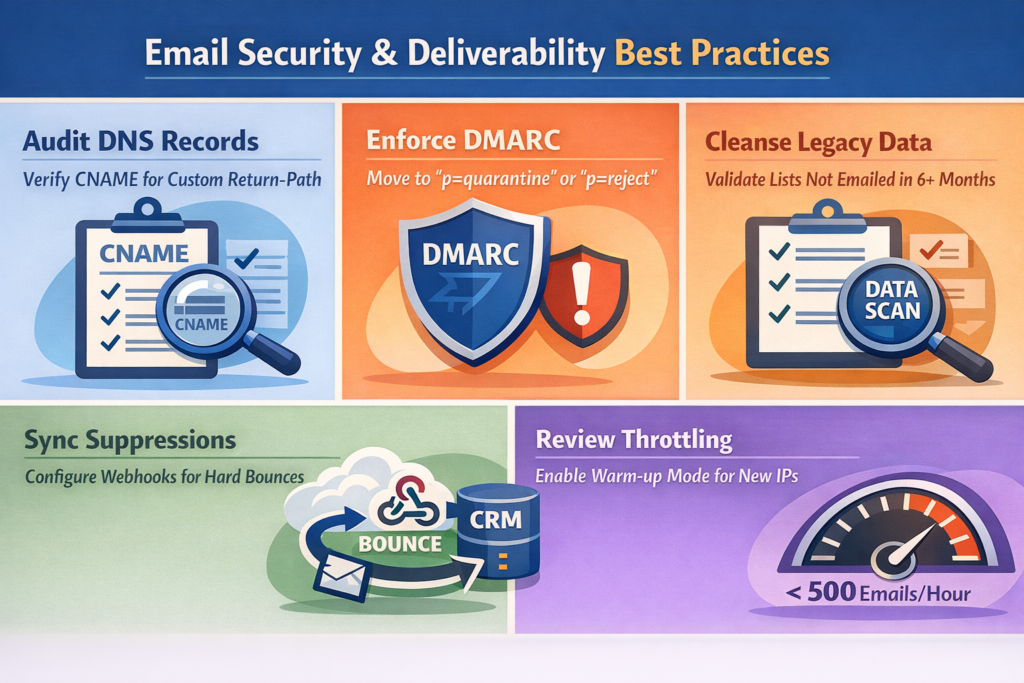
To achieve 2026 compliance standards and protect your deliverability, execute the following technical review:
Audit DNS Records: Verify CNAME records for Custom Return-Path are active to ensure SPF alignment.
Enforce DMARC: Move your domain policy from p=none to p=quarantine or p=reject to prevent spoofing-related bounces.
Sync Suppressions: Configure Webhooks to push hard_bounce events back to your CRM instantly.
Review Throttling: For new or cold IP addresses, ensure Warm-up Mode is active (limiting throughput to <500 emails/hour initially).
Cleanse Legacy Data: Run a validation scan on any list segment that has not been emailed in the last 6 months.
Conclusion
In 2026, a bounce rate is not just a statistic—it is a signal of infrastructure competence. High bounce rates degrade your IP reputation, causing legitimate emails to land in spam folders, costing revenue and brand trust.
By leveraging advanced authentication, automated suppression logic, and real-time validation integrations, you can safeguard your inbox placement and ensure your campaigns perform at an enterprise level.
Ready to harden your email infrastructure?